
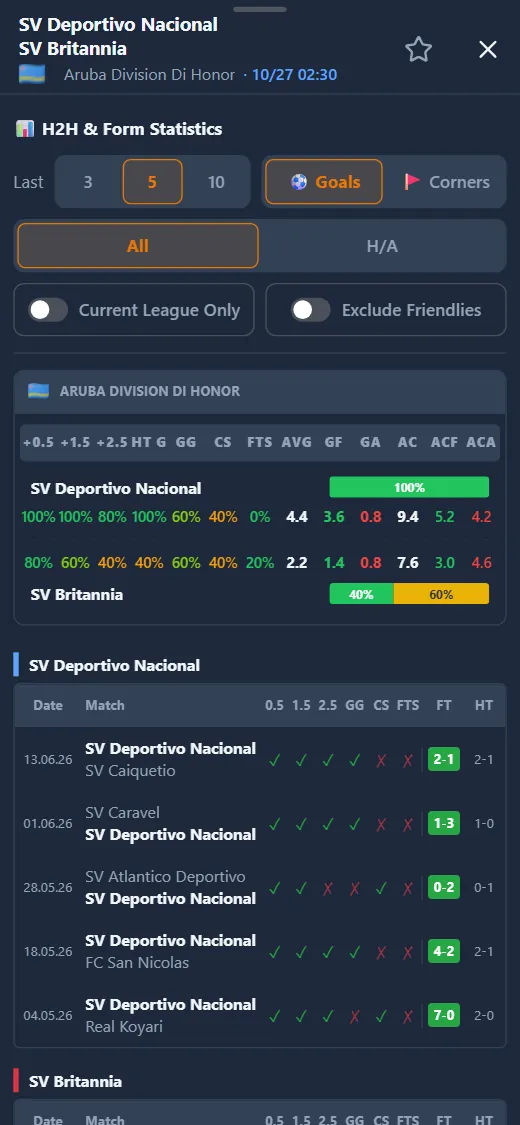
What the panel contains
The first part, H2H & Form Statistics, lines the teams up on the same columns: goal percentages, BTTS, clean sheets, failed to score and goal or corner averages, with each team’s form bar. Then comes each team’s history, match by match, with the date, the opponent, the full-time and the half-time score.
The second part is the league table, with both teams highlighted, and the matrix: their results against every opponent in the league, home and away. On a phone the parts are stacked; on a computer the table and the matrix sit on the left and the analysis on the right.
Display options
Above the stats there are a few controls that change the numbers instantly, without closing the panel:
- Last 3, 5 or 10: how many recent matches count;
- Goals or Corners: goal percentages and averages, or corner thresholds (-9.5, 10-12, +12.5) with their averages;
- All or H/A: every match, or only the home side’s home games and the away side’s away games;
- Current League Only: keeps only matches from this competition;
- Exclude Friendlies: leaves friendlies out of the numbers.
Before kick-off and during the match
The same panel also opens for a live match. It then adds the minute-by-minute event timeline (and, on a phone, the live stats card), and for leagues with matches in progress the table becomes provisional, calculated with the current scores.
With Pro, any match in the history or the matrix opens with a tap, with its result and stats; the Back to match button takes you back to the panel you started from.