
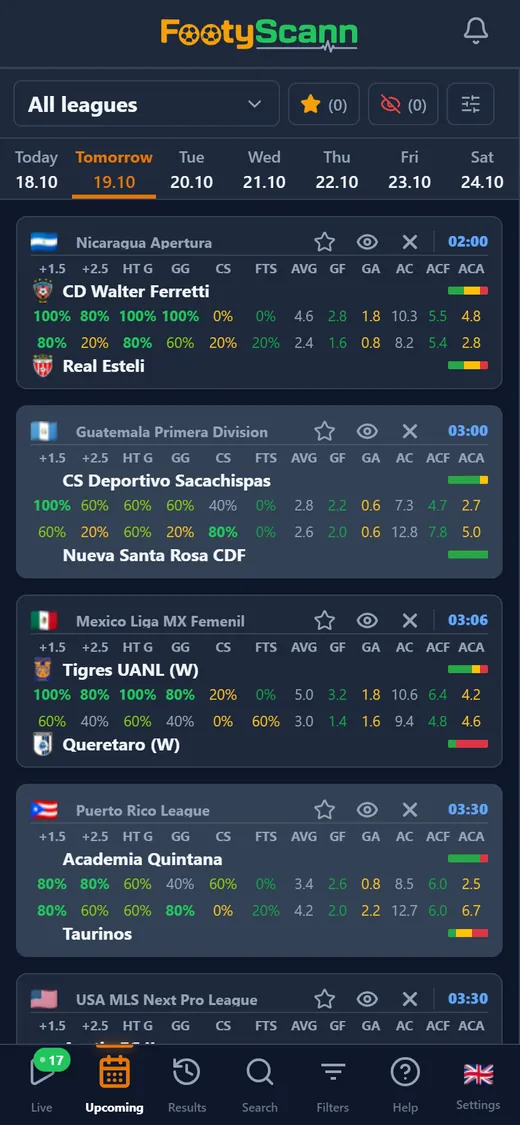
What the card shows
Fixtures are grouped by day: pick the day from the strip at the top, from today through the coming days. Each card shows the league with the country flag, the kick-off time and both teams, each with its crest, its league position and a small form bar: green for wins, yellow for draws and red for defeats, in the proportions of their recent matches.
Under the names come each team’s stats on two rows, home on top and away below, worked out from its recent matches. Percentages are coloured on a scale so the big numbers stand out, and anything at 70% or above is in bold.
What the columns mean
The columns are the same in the card and in the desktop table:
- +0.5, +1.5, +2.5: the share of matches with at least 1, 2 or 3 goals;
- HT G: matches with a goal in the first half;
- GG: both teams scored; CS: clean sheet; FTS: failed to score;
- AVG, GF, GA: average goals per match, scored and conceded;
- AC, ACF, ACA: average corners per match, won and conceded.
How the numbers are worked out
In Options you choose how many previous matches count, 3, 5 or 10, and how they are counted: all of a team’s matches, or only the home side’s home games and the away side’s away games. The same panel lets you narrow the list to a time window.
On a computer the matches sit in a table with every column, and the form bar also shows the percentages. The Stats button opens the match panel with the full history. Filters keep only the matches that meet your conditions, for example both teams with BTTS in at least 60% of their games.