
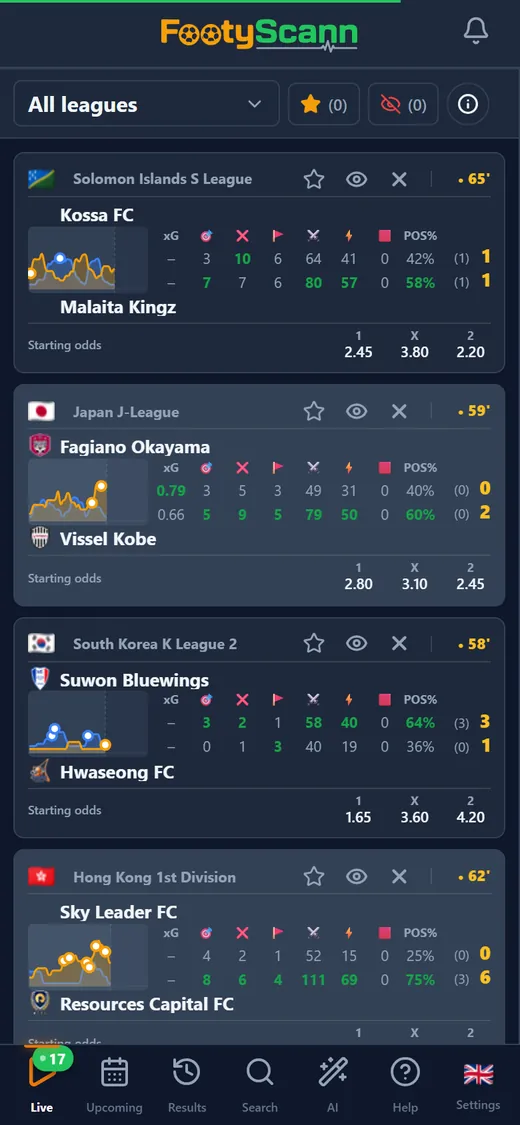
What a live match card shows
At the top you get the country flag, the league and the minute. The minute is orange while the ball is rolling, turns into HT at half-time and FT at the end, and once stoppage time is announced the added minutes appear underneath. Below sit the two teams, home on top and away underneath, each with its crest and its place in the league table.
Between them is the stats row: one column per stat, with the home value on top and the away value below. The higher of the two is green and bold, so you can tell who is on top at a glance. On the right you see the half-time score in small type and the current score, green while the match is live; when a goal goes in, the score flashes. The in-play football stats you can show:
- xG, expected goals;
- shots on target and off target;
- corners;
- attacks and dangerous attacks;
- red cards;
- possession.
The pressure chart and starting odds
Next to the stats is the pressure chart: two lines showing who has been pushing over the last few minutes. Tap it to open the full chart, minute by minute, without leaving the list.
Under the teams you find the starting 1, X and 2 odds, the pre-match prices, when our data provider has them. That puts the live score next to what was expected at kick-off: a favourite that is losing but pushing hard stands out straight away.
Your list, your way
Every card has three one-tap actions; on a phone you also get them with a long press on the card.
- The star marks the match as a favourite; favourite matches can send you goal alerts.
- The eye hides a match you don’t need; you can bring it back from the hidden matches list.
- The X hides the whole league, so the list keeps only the competitions you follow.
- On a computer the matches sit in a table, and the Columns button lets you pick which stats you see and in what order.